Alerts
What lands in Alerts and what does not, how a row is built, the ones you will actually see (a stop that sold in pieces, a stop the broker refused, positions that differ from the broker, a check that did not run, a platform update), and how a row closes itself.
- Who it is for
- Everyone on the book
- Reading time
- 7 min read
- Updated
An alert is the platform telling you something you might act on: a protective stop that sold, an order the broker refused, positions that no longer agree with your broker's, a scheduled check that did not run. Everything else the book does is history and lives on Inbox › Activity. Alerts have no of their own. They appear in two places, and both are the same rows:
- On the Overview
- The Alerts panel, up to the four newest, with Open Activity beside the heading
- In full
- Inbox › Activity with the Problems chip on, one trading day at a time, each alert its own row
- Who writes them
- Code. The , the scheduler and the nightly jobs; a desk role's own note is quoted and carries that role's name
- What they never contain
- Ids, log lines, stack traces or raw broker payloads. Those sit behind Technical details at the foot of the open row on Inbox › Activity
- When empty
- All quiet: "Stale quotes, a stop getting close, a check that keeps saying no: that kind of thing lands here first."
How a row is built
Every row says the same four things in the same order, so you can read a column of them quickly.
- The title is what happened, with the names in it: "The broker's protective stop sold your XOM position", "The 10:30 intraday check did not run".
- One sentence under it says what it means for you and what happens next: "The stop sold 2.8649 shares at $161.52 to $161.67; the position is closed", "Nothing was free to start it in time. Next check 12:30 CT; nothing to do."
- The specifics sit behind a disclosure, named for what they are: Details for the fills, levels and windows written by code, Technical details when an engineering line rides along, The earlier alert for the row a later one closed, and the role's name ("The PM's note", "The 's note") when a desk role wrote the words itself.
- The time is on the right. A row that happened more than once says so in words in a small pill above its title, "twice" or "3 times", never as a multiplication sign.
A row that needs a decision from you carries an orange dot and Open the Inbox, and opens the Inbox; every other row opens that alert on Inbox › Activity and is there to be read. Nothing on this list ever places or cancels an order by itself.
The ones you will actually see
A protective stop that sold, in pieces. When the stop resting at your broker sells before Bellwether's own exit order goes out, the fills of that one stop are folded into one row rather than one row per fill.
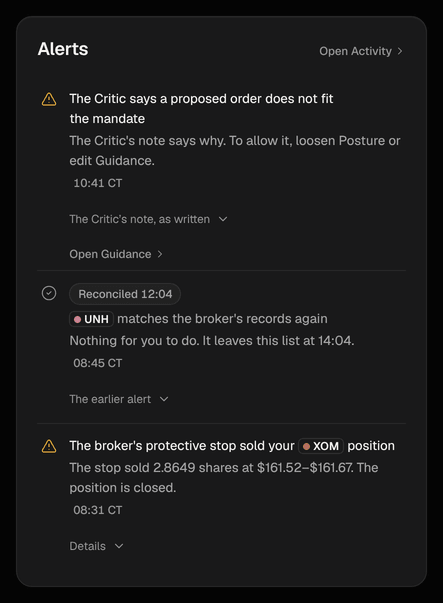
The broker's protective stop sold your XOM position The stop sold 2.8649 shares at $161.52 to $161.67; the position is closed. Details: The price fell to the stop's level before Bellwether's own exit order could be sent, so the stop resting at the broker sold in 2 fills, 2 shares at $161.52 and 0.8649 shares at $161.67 (2.8649 shares, about $462.87). The position this stop covered is closed. Our own pending exit for it was withdrawn, so nothing is sold twice.
The title says "sold part of your position" instead when shares are still held. Exits, targets and stops explains the resting stop itself.
A stop the broker would not move. The row names the broker's own reason in plain words and says where the stop stayed: "another sell order is holding the shares; the stop stays at $266.10". While Bellwether is still retrying, the row carries a Retrying pill that says how often, and the pill disappears once nothing has bumped the row for a while. When a later attempt is accepted the same row turns quiet and leads with the good news, dimmed, with a Restored 14:12 pill: "The protective stop on IWM is back in place. The broker accepted the stop on the retry. Nothing for you to do." The refusal itself moves behind The earlier alert, never struck through and never left shouting.
Positions that differ from your broker's. Bellwether always trades on the broker's count, so this is a bookkeeping difference, not a lost position: "XOM reads 12 shares on the books but 10 at the broker" with "Bellwether trades on the broker's count; the books catch up at the close." Details name the usual causes (a transfer, a corporate action, a canceled trade or a fill that was not recorded) and tell you to check the broker's activity if it keeps happening. When the two agree again the row says "XOM matches the broker's records again" with a Reconciled 12:04 pill and leaves the Overview about two hours later; both rows stay on Activity for good, each with its own time.
Notea difference one of our own orders explains is not an alert at all. A sale that is settling, a fill recorded moments after the positions were read, an order still open that would cover it: each of those buys a minute or two of doubt before anything is raised, so a normal fill never pages you. A smaller count at the broker while a sale of ours is still settling is the ordinary case of that, and nothing is raised. The one difference that is never explained away is a position the broker shows as short, below zero shares. No order of ours may ever take a position below zero, so nothing of ours can be the cause, and that row is raised at once.
A check that did not run. The title names the check and its time, the sentence names the cause and what happens next, and Details name the window it had: "The 10:30 intraday check did not run", "Nothing was free to start it in time. Next check 12:30 CT; nothing to do.", "Its start window ran between 10:30 and 10:50 CT (20 minutes)." Causes are said plainly ("The desk was still in an earlier check", "Today's model budget was already spent", "The model provider was rate-limiting us"). One missed check with a later one the same day is a note; the last check of the day going missing is a warning. No trades today is the page for the "nothing happened" version of this question.
A platform update. When a limit you never typed is re-derived because Bellwether changed how it scales, a row headed Platform update says which limit and by how much, for example "The platform raised your from $150 to $450", with "It now grows with the account, so trading stops later in a losing day." Details give the figure that was enforced before and the one enforced now, the equity they were worked out on, and the way back: type your own number on Risk › Halts for the loss , or on Risk › Limits for an order cap, and it stays fixed as an override. Read the release notes under the row opens the release notes for that release.
A platform fix, verified. When a release fixes a defect the desk had flagged on this book, a row titled "A platform fix was verified on this book" says the fix was checked on this book's own names, and the desk's notes about the old problem are closed. Nothing for you to do.
A desk escalation. When a desk role finds that the mandate you set rules out something it wants to do, the title says so ("The PM says the mandate rules out what it wants to do") and the sentence names the two ways to allow it, loosening the or editing your . The role's own note sits behind its disclosure, and the row carries an Open Guidance link straight to Strategy › Guidance so you can settle it.
Orders fold, numbers stay whole
Several order alerts of the same kind read as one row with the names in it, "3 orders need your approval" with "SPY, IWM and QQQ · approve by 14:30 CT", so a busy morning does not push everything else off the panel. The Overview keeps the four newest rows; Inbox › Activity has all of them, one row each.
What alerts are not
They are not a second copy of the trading log. Routine things (sessions that ran, orders that filled normally, settings you changed, end-of-day books) are on Inbox › Activity, where they can be filtered and downloaded. They are also not the platform's own on-call monitoring: anything that is Bellwether's problem rather than your book's stays off your Overview. It goes to the people who run the platform, and on Inbox › Activity it is a System row, shown when System events is switched on, for the record.