Reading Bellwether's mind
What the "Bellwether's mind" card on the Overview tells you at a glance (what it is doing, what happens next and when, why it has not traded, whether it needs you) and how to open one name for the detail.
- Who it is for
- Everyone on the book
- Reading time
- 11 min read
- Updated
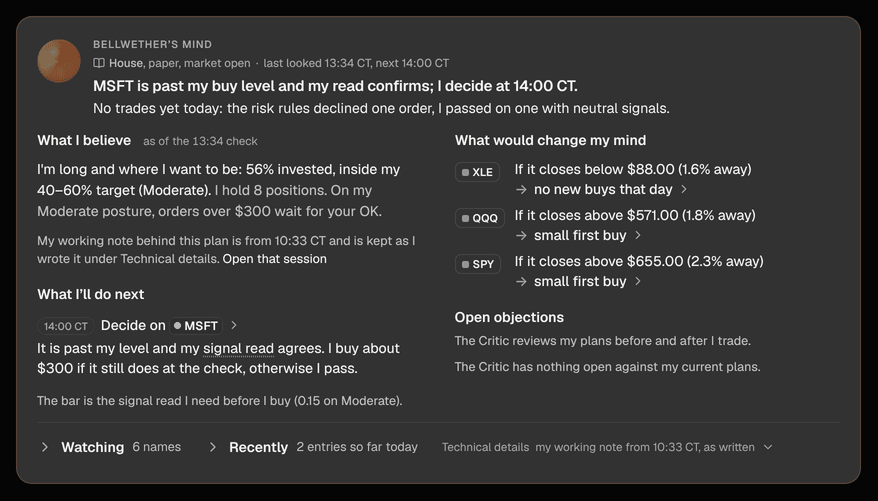
The card headed Bellwether's mind on the Overview, under the positions list, is built to answer four questions in a few seconds on a phone: what is Bellwether doing right now, what will it do at the next check and when, why it has not traded, and does it need you. It says all of that in sentences first and keeps numbers, thresholds and the PM's own notes one tap away. Everything on it is computed from records the platform already holds (what it is watching, today's and what became of them, today's fills, the schedule); nothing on the card is the model talking, and nothing here places an order.
The top three lines
- The status line (small, grey) says, in this order, whether real money is at stake, the you chose, whether the market is open, when a session last looked and when the next one checks: a , Conservative, market open, last looked 20 minutes ago, next check 14:30 CT (in 35 minutes). After hours it says the market is closed, which close the prices are from (prices as of 15:00 CT) and when the next session runs (tomorrow 08:00 CT). While a session is running it says thinking now (started 14:30): reading prices for 6 names and the session's own plain-words lines appear underneath, newest first, until it finishes.
- The headline: one sentence chosen by the most pressing thing on the list. Bellwether wants your OK on 1 trade before 14:30 CT. / MSFT is past its buy level; Bellwether decides at 14:30 CT. / Bought SPY and QQQ today. / Watching 6 names; nothing is close to its level. Next check 14:30 CT. When nothing has traded today and there is a reason, a second sentence says why: No trades yet today: 2 declined by risk rules, 1 passed on neutral . The headline is worked out from the rows below it, so it cannot disagree with them, and it never quotes the PM.
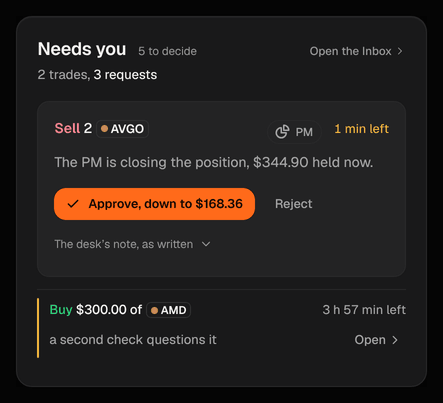
- The card carries no button of its own for orders that wait for you: they sit in Needs you at the top of the same page, which prints the one count of what is waiting (5 to decide: 2 trades and 3 requests).
If trading is or paused, the banner across the top of the page says so once (what stopped, who set it, since when, and whether exits still go out) and the card does not repeat it: its headline says what the desk is doing meanwhile (I am still watching and planning. My next look is 12:30 CT.). One halt is different: when the halts itself on a fault (it cannot reach the broker), nothing is sent at all, exits included, until the connection is back, and the banner says exactly that.
Four blocks in the desk's own voice
Under the headline the card reads as four short sections, each built from structured records:
- What I believe: where the book stands against its target (I'm long and where I want to be: 56% invested, inside my 40–60% target (Moderate).), how many positions it holds and where your sits. Under it, the PM's latest desk note is quoted whole, marked my note with its time and a link to the session that wrote it. If that note contradicts the numbers above it, the card withholds it and says so, with the same link.
- What I'll do next, and why: the next certain actions in order, each with its time, the name and one sentence of reason (Decide on MSFT. It is past my level and my signal read agrees; I buy about $300 if it still does at the check, otherwise I pass.). The first time a reason says signal read or the bar, the words carry a dotted underline: hover, or tap them for what they mean and the number behind the bar.
- What would change my mind: the levels that would make it act, one line per name (QQQ: if it closes above $571.00 (1.8% away), small first buy).
- What I'm arguing with myself about: the 's open points, gathered by name and not listed one finding at a time. Each name appears once, with one answer per name, so a name the Critic raised twice is still one entry. With nothing open it says The Critic has nothing open against my current plans.
When the day's open question is about a single name and the Critic has two or more points on it, that name gets one block at the top of the card (Price, The Critic, My plan) and is not repeated in the sections below.
Watching: one row per name
Below the four blocks, Watching is folded shut and says what it holds in one line (6 names: 1 ready, 2 declined or passed today, 3 waiting on a level). Open it and every name the PM cares about today gets exactly one row: its symbol chip, a one-word state, then the few facts that matter for that state. A name with two price levels, a proposal this morning and a fill this afternoon is still one row; the earlier events are inside its detail. Rows are sorted by what matters: what needs you, then what is about to happen, then what explains why nothing traded, then what is merely waiting (nearest first), then what was bought today. A phone shows four rows and a desktop six; Show all N says what the hidden rows are (Show all 11 (7 more waiting)), so folding never hides news. Recently, under it, is the day's short log of what already happened.
Each row carries one of ten states:
needs you
- It means
- A proposal is over your approval line and waits in the Inbox until the time shown (your OK by 14:30 CT), in orange.
ready, lined up or at broker
- It means
- The level was reached and the signal read agrees, so the next check decides; or an order is lined up for its window; or it is already working at the broker at its limit.
challenged
- It means
- The price is past the level but the Critic has an open serious point on the plan; the row carries the count (2 Critic points open) and the PM answers it first.
withdrawn
- It means
- The PM proposed it and then withdrew it before it was sent.
unconfirmed
- It means
- The price is past the level but the signal read does not clear the bar, so nothing is proposed yet.
declined
- It means
- It tried today and the Executor's rules said no, with the reason in plain words (stop-loss too close). If you declined it yourself, or nobody answered before its window closed, it says that instead.
blocked
- It means
- It would act, but a day allowance (loss or order count) is used up. It resumes tomorrow, or sooner if you raise the allowance on Risk.
passed on
- It means
- It looked and chose not to trade, with the reason from a fixed list (signals neutral, earnings too close, your rules it out, and so on).
waiting or holding
- It means
- Nothing happens until the level is met. The words say how it is judged: a daily close above, the price to get above, the price to hold above. A name you hold with only an exit level reads holding.
bought or sold
- It means
- Filled today; the change since the fill is the only green or red on the card.
When a price is older than it should be during market hours the row says when it is from; when the platform has no price for some names at all, one gray line says so once instead of every row apologizing.
Open a row: the detail
A row opens a sheet from the bottom on a phone, or a panel beside the list on a wide :
- I want to (or I wanted to, once it is over) / Waiting for: what it means to do, or what it is waiting for, in a line (buy about $300 once the price held above $912.00).
- My signal read and The Critic, when either bears on the name: whether the read clears the bar, and what the Critic said about this plan.
- What stopped it (declined, blocked and passed rows) or Why I backed off (a withdrawn one): the reason in words.
- What happens next: If you approve, I buy about $300 right away at up to $150.00, after one more risk check. If you decline, nothing trades. When an order is lined up and the Critic has an open serious point on it, this line starts I answer the Critic's open point on it before the window.
- Earlier today: the row's history as short timed stamps, oldest first: started watching at 09:35, proposed at 10:10, declined by the risk rules at 10:10.
- Technical details (folded): first the desk's working note on this name, whole, in quotes and exactly as the desk wrote it for itself, with a link to the session that wrote it; then the raw trigger expression, the stop, the against the , the distance in ATR, the votes, the policy's reason as written and the ids. This is the one place the desk's shorthand may appear. Useful when you are comparing with a log; never needed to understand the card, because the lines above say the same thing in plain words.
- Actions: Ask why sends Consult a question built from the row's own facts and opens the answer as it streams. Review in Inbox appears on a row that needs you. Stop watching opens Guidance with a note to the PM started for you; Don't trade LLY opens Risk › Universe with the name typed into the never-trade list for you to confirm. Someone viewing your book read-only sees Ask why and nothing else.
How Bellwether chooses what to watch
A book with nothing on its list yet says so: I have not picked anything to watch yet. I build my list at the next session (tomorrow 08:00 CT). A newly connected book says first that it is setting up your desk, research first and then the plan, with about when the plan is ready. At each session the PM reads your watchlist, the names you hold, the and the strategy's candidates, and writes down the few price levels it would act on and what it would do at each; those become the rows. It also arms an exit level for everything you hold. Between sessions the Executor watches those levels and wakes the PM when one is reached. If you want the first list to lean somewhere, leave it a note before the session; every note must be .
The rest of the Overview
- Hero equity: total equity with the environment beside it (Paper or Live), the change for the selected range and the curve beneath, with the window's open, high and low (and when each printed) and the dashed line's meaning written under the plot. The line under the figure is the day's change, and the row above the figure says in a few words what the desk is doing or what waits for you and when it looks next. Seven figures sit beside the chart in the same panel. Hover to scrub; session runs and fills are markers on the line. Before the open the one-day view says when the market opens instead of drawing an axis of times that have not happened. The eight account figures sit in the same panel: Cash, Invested, Day P&L, Total P&L, Max (with the auto-halt level), Win rate (closed ), New orders today against the daily cap (trading decisions; protective stops and re-sends of the same order do not count), AI cost against today’s budget. On a phone the last four are behind More figures.
- Needs you: beside the hero (under it on a phone): what is waiting for a yes or a no, the most urgent first (a protective exit is pinned on top, then the soonest deadline). The first gets a card with one sentence about what it is, the price now if it has moved, and Approve / Reject (the order's own words open its full card in the Inbox); the rest are one-line rows with how long each has left, and a row that can be approved in one tap says the most it may pay. An order that expired unanswered leaves the list. While the market is closed a card says so and when an approved order would go. When nothing is waiting it is one line with the desk's next look.
- Positions: the eight largest (five on a phone or a short laptop window), one row per name: sparkline, quantity at average cost, last price, unrealized P&L, share of the book against its cap; a row opens the symbol sheet, and See all opens Portfolio.
- Risk: three read-only meters, used against the allowance, with the words beside them. Open limits opens Risk.
- Alerts: the four newest things that needed a second look, repeats collapsed with a count. Routine events live on Activity.
- Advisor and the day in words: the Advisor's top line as one sentence with the setting it proposes (See all advice opens the Inbox, where all of it is kept), and the last trading day said in two sentences.
The thinking mark
While a session runs, the dot at the front of the Running pill is a small swarm of light that pulls in tight and warms to orange: the desk is thinking. It is there only while that is true, and it falls away the moment the session ends. The same mark appears in while an answer is being worked on and in Strategy while your guidance is being read.
Reduced motion
With reduced motion on in your OS or browser the orb renders one still frame, the thinking mark is a still picture, the card's edge stops crawling while a session runs, the live lines appear without a fade and the sheet opens without sliding. States are still told apart by the words, the tag beside each row and the pill.